
Home/Features/Financial Reports
Financial reports that answer what your business actually earned
See who owes you, what you have earned, where the money went and what your GST position looks like, without building a spreadsheet. Every report is drawn from the invoices and expenses you have already recorded.
Answers in seconds
Get to a number in three simple steps
No setup and no formulas. Open a report and read it.
Step 01
Pick the report
Choose from receivables, revenue, tax, customer and expense reports, all built from the invoices and bills you have already entered.
Step 02
Set the period
Set a date range that matches how you think, a month, a quarter or a financial year, and the numbers rebuild instantly.
Step 03
Read or export
Read it on screen or export it for your accountant, with the underlying documents still one click away.
Reporting features
Everything you need to read your own business
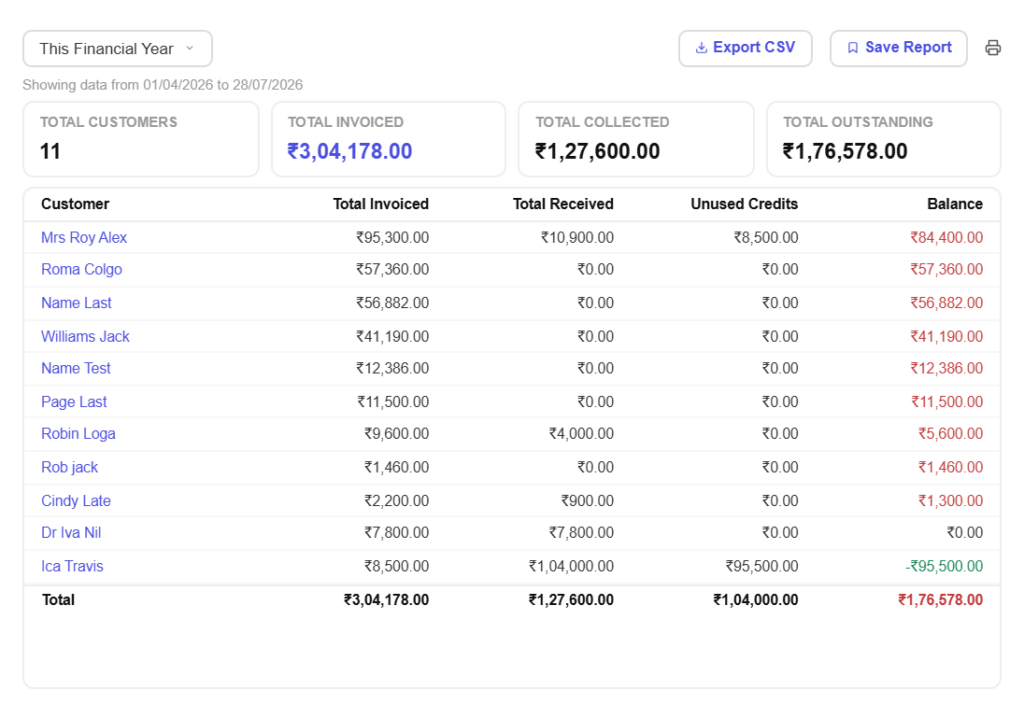
Know who owes you what
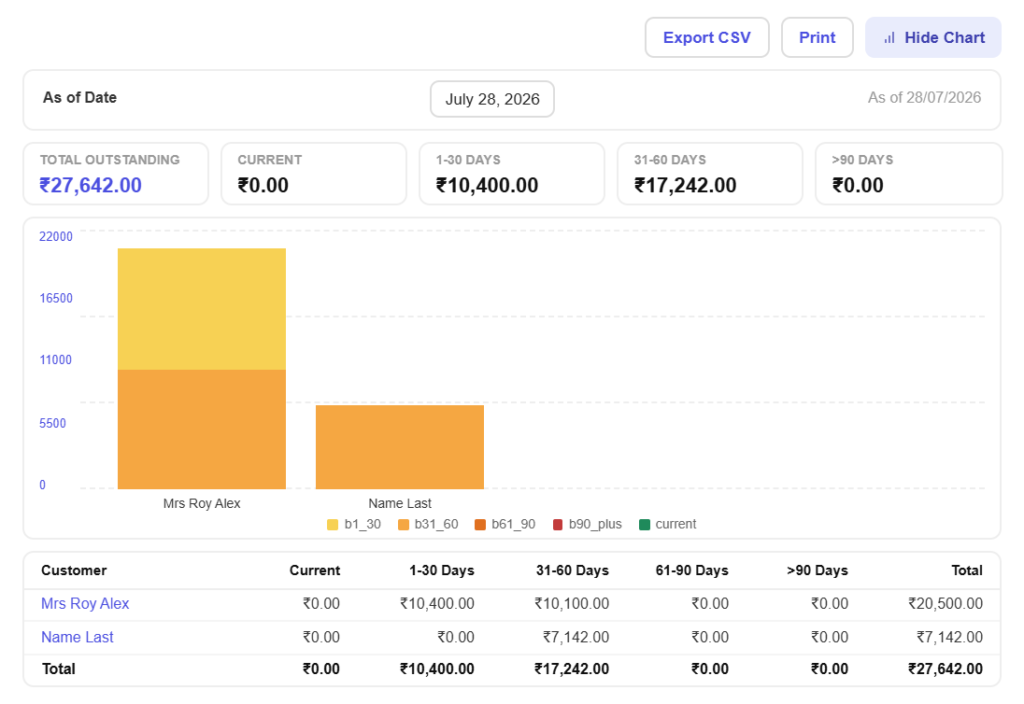
Ageing that tells the truthSee outstanding invoices grouped by how overdue they are, so the ninety-day problem is obvious long before it becomes a write-off.
Chase the right peopleSort receivables by customer and value and spend your follow-up time where the money actually is.
See what you actually earned
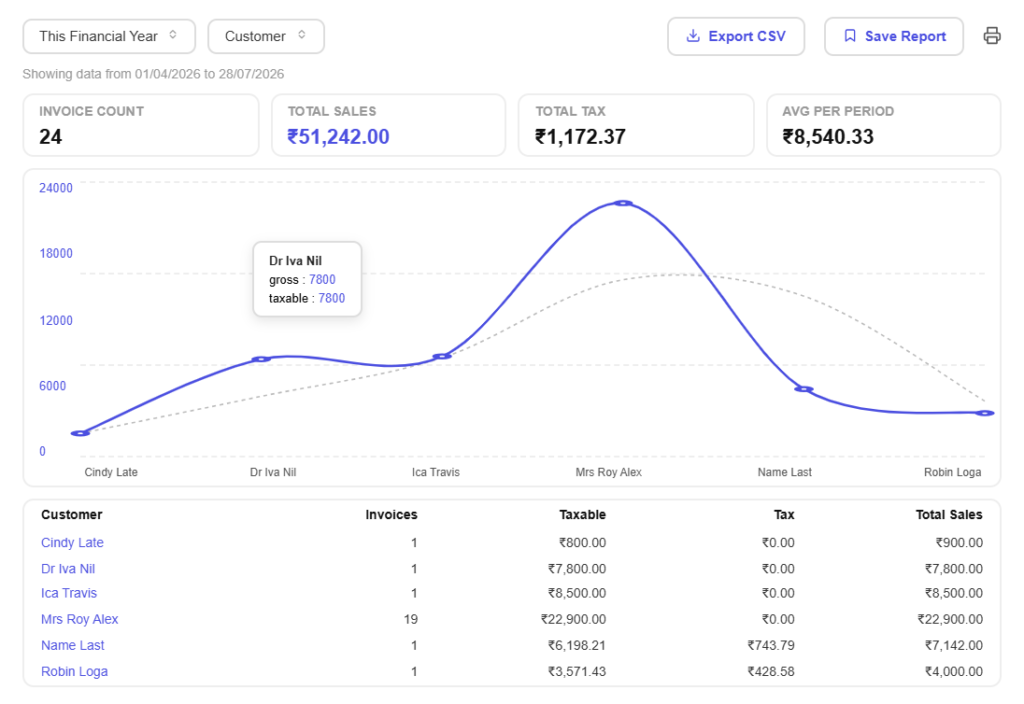
Revenue over timeCompare months and quarters to see whether the business is genuinely growing or simply busier than it was.
Paid versus billedSeparate what you have invoiced from what has landed, because the gap between the two is what cash flow really means.
GST summarised, not calculated
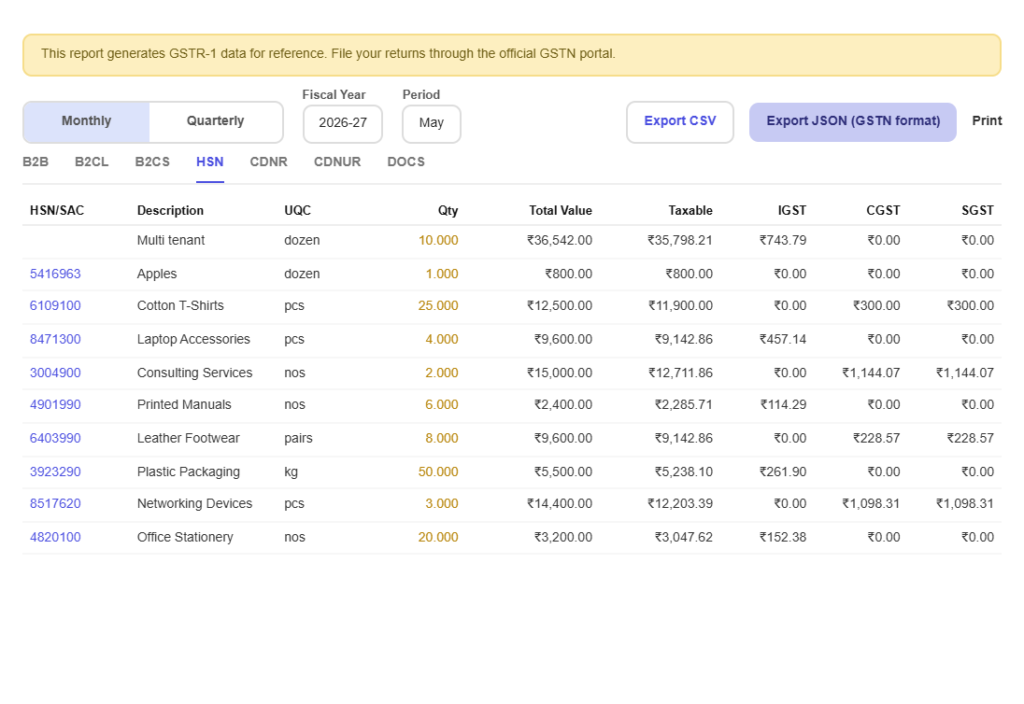
GSTR-ready summariesGet output tax pulled together by slab and period, with credit notes accounted for, so filing is a review rather than a rebuild.
Input and output side by sideSee the tax you charged next to the tax you paid, so your net position is not a surprise at the end of the month.
Understand your customers
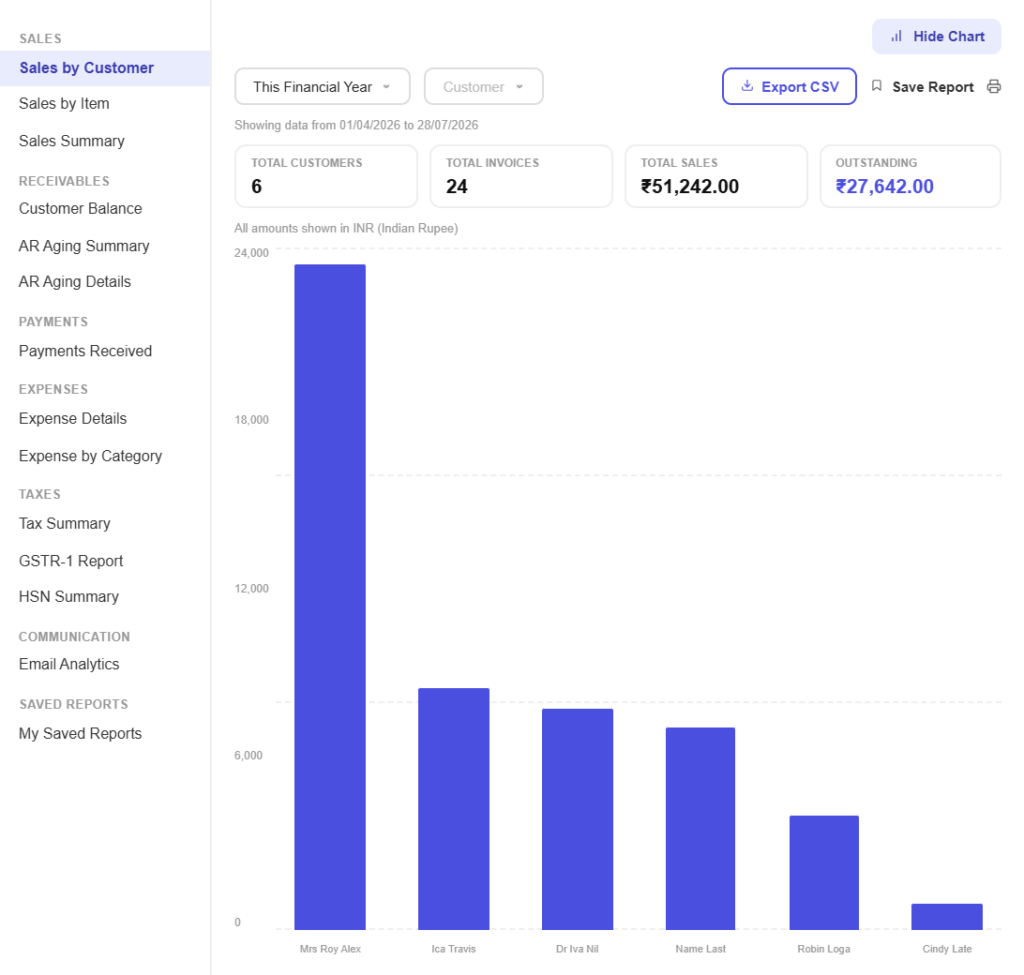
Your best customers, rankedFind out who contributes most of your revenue, and how concentrated that is, which is the risk nobody looks at until it bites.
Who pays late, consistentlySpot the clients whose invoices always take an extra month and price or chase accordingly.
Watch where money leaves
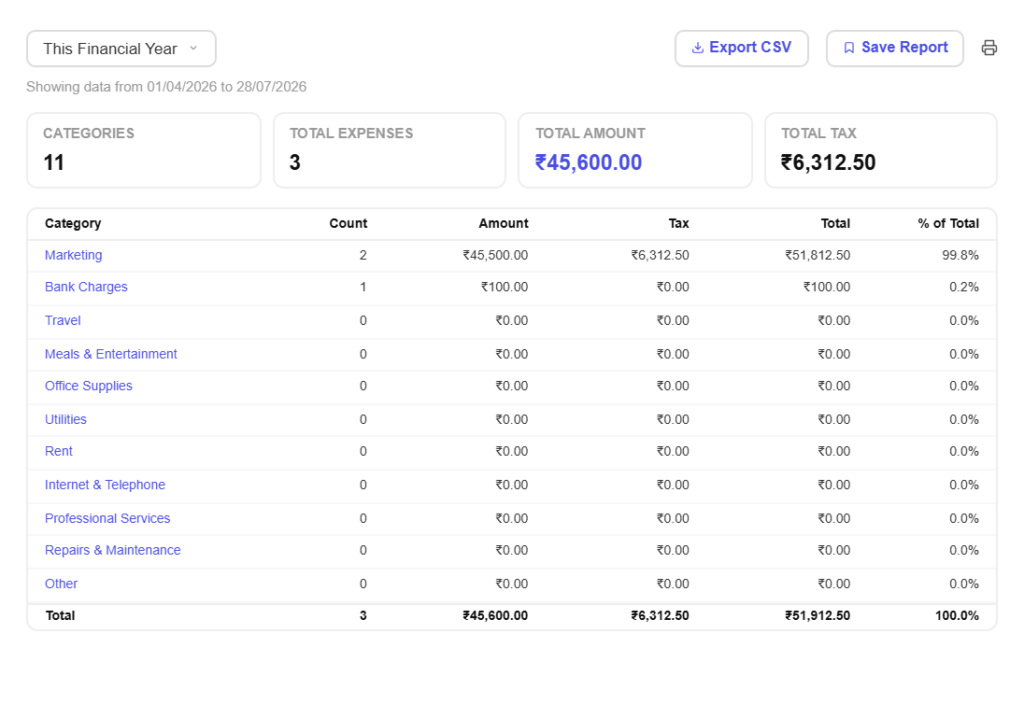
Spending by categoryBreak costs down the way your business runs and see which lines grew while you were busy delivering.
Cost against incomePut what you spent next to what you earned across the same period and read the margin instead of estimating it.
Hand it over cleanly
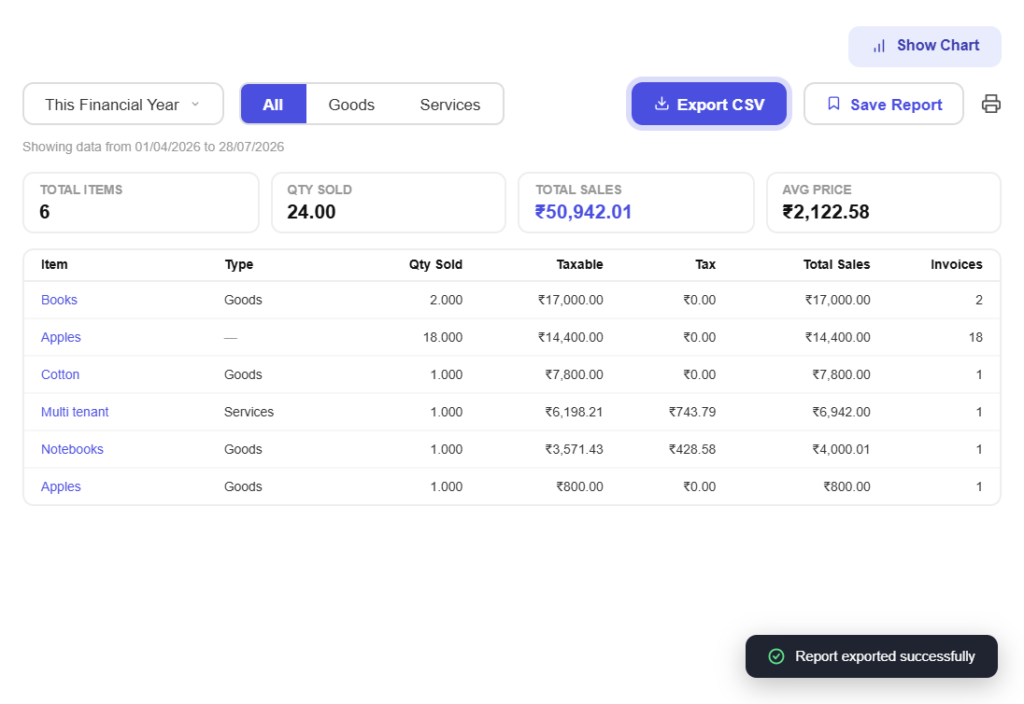
Export in a format they acceptSend your accountant clean data rather than screenshots, with invoices and receipts still attached in Pinvoice.
Drill back to the documentEvery figure traces back to the invoice or bill behind it, so a question about a number has an answer, not a debate.
All in one place
One platform that goes beyond reports
Reports are the payoff. Pinvoice brings your whole billing workflow together.
Quotes & estimates
Send quotes and convert approved ones into invoices in one click.
Credit notes
Issue GST-safe credit notes for refunds and adjustments.
Expense tracking
Record business expenses and rebill them to clients.
Items & pricing
Save products with rates, HSN/SAC codes and GST slabs.
Contacts
Keep customer GSTINs, history and balances in one place.
Users & roles
Invite your team and accountant with the right permissions.
Payments
Record UPI, bank transfer, cheque or cash against an invoice and watch the outstanding balance update straight away.
For every kind of business
Reporting for your line of work
Every trade measures success differently. Pinvoice reports on the numbers that matter to yours.
Stop running your business on a hunch
From receivables to GST summaries, Pinvoice turns your billing into answers, free, forever. Create your account today.
Free foreverNo credit cardCancel anytime
FAQ
Reporting questions, answered
What reports does Pinvoice include?
Receivables and ageing, revenue over time, GST summaries for output and input tax, customer and item performance, and expense breakdowns by category and vendor. All of them are built from the invoices and bills you have already recorded, so there is nothing extra to maintain.
What is an ageing report and why does it matter?
An ageing report groups unpaid invoices by how long they have been outstanding, typically current, thirty, sixty and ninety days plus. It matters because it turns a single outstanding figure into a picture of risk, showing which debts are drifting towards not being paid at all.
Can I export reports for my accountant?
Yes. Reports export in formats your accountant can work with, and because the underlying invoices, credit notes and receipts stay in Pinvoice, anything they query can be traced back to the original document.
Do the reports help with GST filing?
Yes. Output tax is summarised by slab and period with credit notes accounted for, and the data exports GSTR-1 and GSTR-3B ready. It does not replace your accountant, but it removes the spreadsheet stage before filing.
How current are the numbers?
They reflect what you have recorded. Because invoices, payments and expenses update the reports as you enter them, the figures are as current as your bookkeeping rather than a monthly snapshot.
Is financial reporting free?
Yes. Reporting is part of Pinvoice at no cost, with no limit on how many reports you run or how far back you look, and no credit card needed to start.